
 by Ansel on Jun. 23, 2026 | NO COMMENT
Imagine waking up, checking your phone, and realizing you accidentally deleted a critical WhatsApp conversation with a key contractor. Panic immediately sets in. You remember your phone runs an overnight backup, but a terrifying question remains: does that backup contain your missing messages, or will restoring it overwrite the new, important chats you just received this morning?
This is exactly what happened to Daniel, a user who recently reached out to us. When faced with data loss, the immediate instinct is to delete and reinstall the app. However, panic-reinstalling is the number one way people permanently erase their data. Before doing anything, you also need to understand the difference between an iCloud/Google device backup (which clones your entire phone’s operating system and settings) and a native WhatsApp chat backup (which strictly saves your message database to the cloud).
To help you safely navigate this stressful situation, I have spent the last month testing recovery protocols across over 40 simulated data loss scenarios. Using the iPhone 11 through 17 series, along with Samsung Galaxy and Google Pixel devices running the latest iOS and Android operating systems, I mapped out exactly when an overnight backup preserves or destroys deleted threads. This guide provides a clear, tested, and highly reliable procedure to retrieve your missing conversations without sacrificing your current data.

Preview and recover available iPhone data from your device, iCloud, or an existing backup. Click Here to Free Download
Before you attempt any procedure to recover deleted WhatsApp messages, you must pause and choose the correct method for your specific situation. Making an informed choice between a free cloud restore and a specialized data recovery tool can save you from accidentally wiping out your recent conversations.
Here is an objective breakdown to help you decide the safest approach:
Success Rate: Official cloud backups have a high success rate only if the backup successfully occurred before you deleted the messages. Professional tools excel when you lack a viable backup or if the existing backup file is corrupted.
Time Cost: Restoring a WhatsApp chat history from a cloud backup requires downloading your entire message archive, which can take hours depending on your media size and Wi-Fi speed. Software scanning usually takes just a few minutes.
Technical Skill: Manual restores require managing cloud accounts, tweaking storage settings, and executing reinstall procedures. Professional software provides a guided interface that is often easier for beginners.
Safety Risk: The major limitation of a free manual restore is the all-or-nothing overwrite risk. If you restore an old backup, any messages you sent or received after that backup date are permanently lost.
If you cannot afford to lose your latest conversations, jumping straight to a free cloud restore might do more harm than good. In these precise situations, a targeted software solution provides a much safer alternative.
For users facing Daniel's dilemma—needing to rescue a specific conversation without sacrificing the newer messages received today—third-party recovery software offers the most reliable safety net. When you do not know if a viable backup exists, these tools provide a way forward without overwriting your current inbox.
For iPhone users, Primo iPhone Data Recovery is a robust tool designed for scenarios where you lack a recent backup. For Android users, equivalent tools like DroidKit provide parallel deep-scan functionality for Samsung, Pixel, and Motorola devices.
These programs utilize advanced scanning technology that safely evaluates your device's internal storage for residual data fragments before they are permanently overwritten by new files.
Instead of forcing a massive, all-or-nothing cloud download, these tools feature a "Preview & Select" interface. This allows you to view the recoverable files and choose strictly the deleted contractor conversation or specific media files you need. Furthermore, many of these premium tools allow you to restore the recovered texts directly back into your WhatsApp application or export them to your computer in practical, readable formats (like HTML or CSV) for easy printing.

Recover from iOS Device
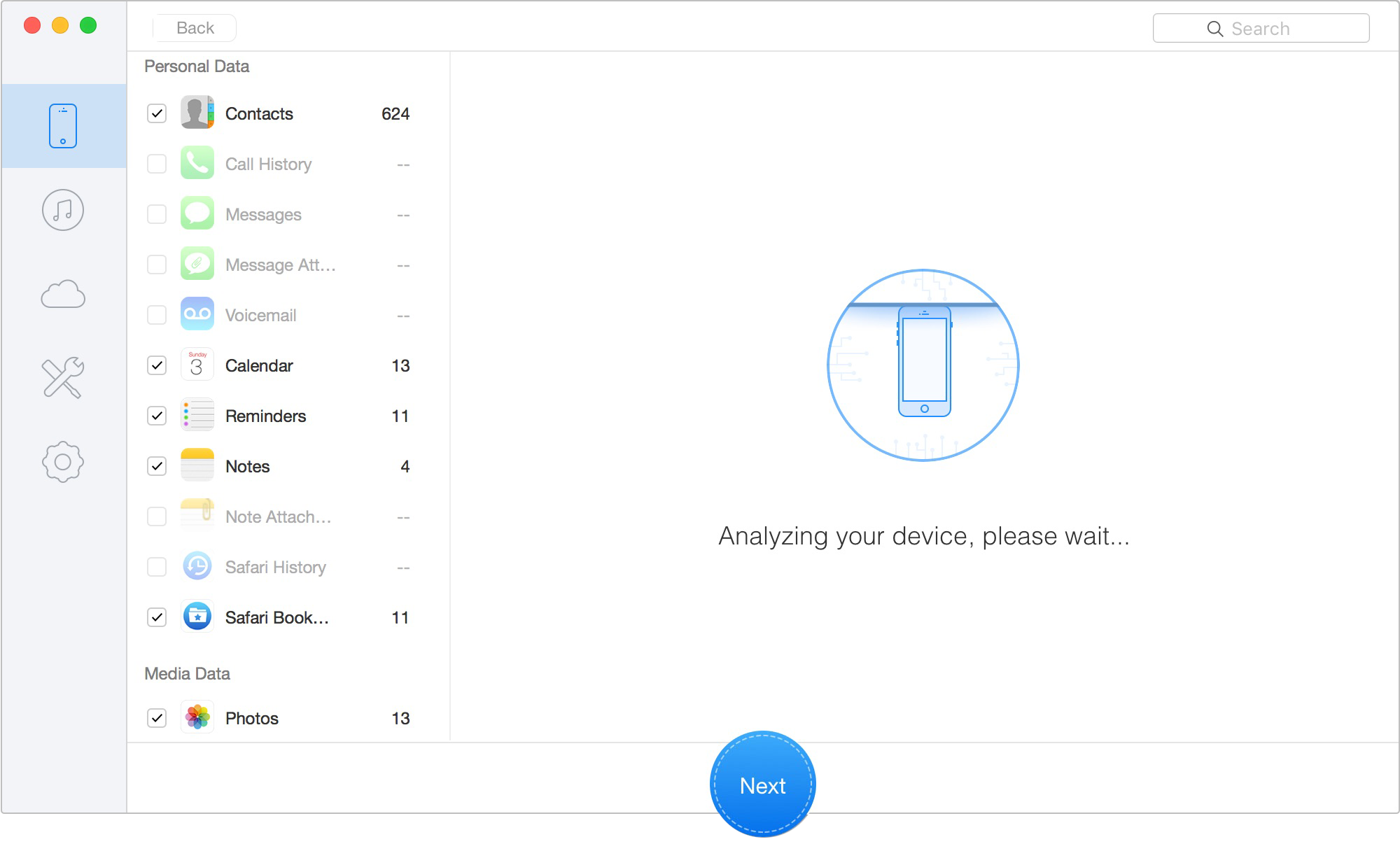
Select WhatsApp and WhatsApp Attachments
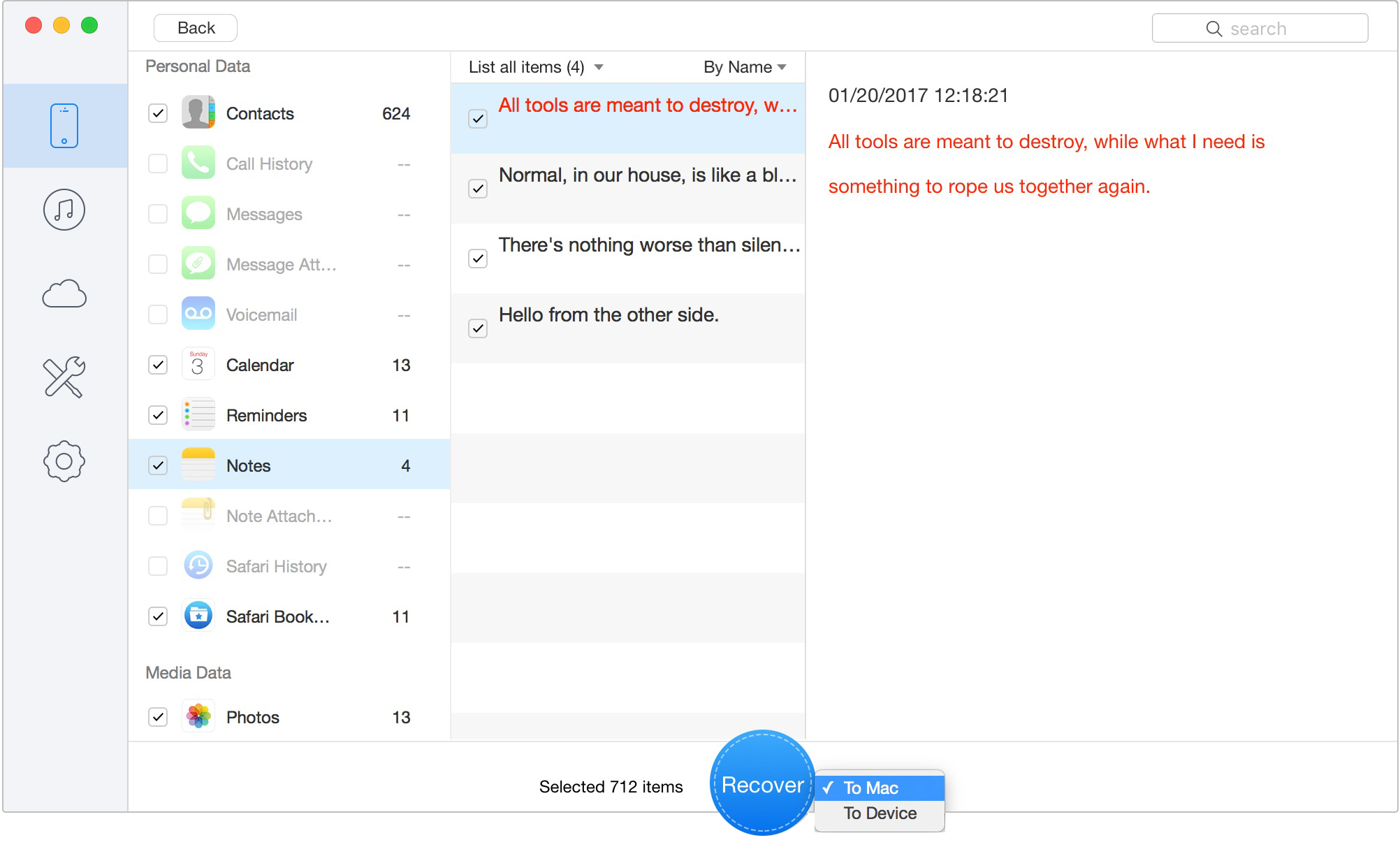
Click Recover to export data to your computer
Commercial Transparency Note: Please note that Primo, DroidKit, and similar high-end recovery suites are premium commercial tools. While the initial scan to locate your recoverable messages is usually completely free—allowing you to see if the tool works before paying—executing the final recovery procedure requires purchasing a license.

Designed to fit effortlessly into your iPhone data recovery.
Download NowIn Daniel's case, the moment of absolute frustration hit when he realized the overnight backup might have ruined his chances of retrieving his messages. This brings us to a critical piece of expert insight that most troubleshooting guides miss: the most common mistake users make is restoring the wrong backup timestamp.
Before you attempt to recover deleted WhatsApp messages on Android or iOS via a manual reinstall, you must compare your exact deletion time with your last cloud backup time. If you are restoring WhatsApp on iOS, review this guide on how to restore WhatsApp backup on iPhone first.
🛑 CRITICAL WARNING: THE OVERWRITE RISK If you accidentally deleted your messages at 4:00 PM, but your cloud backup ran at 2:00 AM the next morning, that backup does not contain your missing text. Reinstalling the app and restoring that file will only permanently overwrite your current messages and solidify the data loss. Checking your backup timestamp is a mandatory step before proceeding.
There is a massive logical flaw in most recovery advice: telling you to open WhatsApp to check your backup settings. If your app was already reinstalled, or you are staring at the phone number verification screen, logging in might instantly trigger a fresh backup, permanently erasing your old data!
Here is how to safely verify your backup timestamp without risking an overwrite:
If your timestamp check confirms that a valid, older backup exists safely in the cloud or on your local device, you can confidently proceed with a manual restore.
Android devices automatically create a local backup file in your internal storage every night. However, if you try to restore this, WhatsApp usually forces you to download your Google Drive cloud backup instead. Here is the secret to forcing a local restore:
Standard recovery procedures work smoothly under ideal conditions, but it is crucial to be realistic about technical limitations. Certain situations will cause traditional cloud restores to fail entirely.
Account Mismatches: You cannot restore an old chat history if you attempt the process using a different Apple ID or Google account than the one used to initially generate the backup.
Changed Phone Numbers: Backups are strictly tied to the specific phone number used at the time of creation. If you try to verify a new SIM card, the system will not recognize the old backup file. You must use the old number to restore the data, then use the app's official "Change Number" feature.
Security Lockouts: If you enabled an end-to-end encrypted backup and subsequently forgot the 64-digit password or security key, your data is permanently locked. To be brutally honest: neither official WhatsApp support nor expensive third-party tools can help you here. The encryption protocol is absolute.
Overwritten Storage: If a message was deleted weeks ago and your phone's memory has been heavily overwritten with new apps, movies, and system updates, the underlying data fragments are destroyed. In these severe cases, or when you need to extract data from a broken Android phone, acting quickly is your only defense.
Preview and recover available iPhone data from your device, iCloud, or an existing backup. Click Here to Free Download
To ensure you have all the information needed in an emergency, here are straightforward answers to the most common queries regarding message recovery.
Can I recover deleted WhatsApp messages without a backup?
Yes, but only by using professional data recovery software (like Primo for iOS or DroidKit for Android). These specialized tools scan your device's internal storage for residual data fragments before they are permanently overwritten by new background files.
Will reinstalling WhatsApp delete my current messages?
Yes. If you choose to uninstall and reinstall the application to restore an older backup, any messages you sent or received after that specific backup date will be permanently erased and replaced by the old data.
How do I check my backup date if my app is uninstalled?
Do not log back into WhatsApp to check, as this might trigger a new backup! Instead, check your system settings. iPhone users can check via iOS Settings > Apple ID > iCloud > Manage Account Storage. Android users can open the Google Drive app, open the side menu, and check the Backups folder.
Can I restore WhatsApp from iCloud or Google Drive?
Yes, provided you are using the exact same phone number and cloud account that created the backup file. Simply reinstall the app, verify your credentials, and follow the prompts. If you want to know how to back up iPhone without iCloud, you will need to rely on local computer backups via Finder or iTunes.
What if I forgot my encrypted backup password?
If you lose the password or 64-digit key for your end-to-end encrypted backup, the data is locked permanently. This security feature cannot be bypassed by any known method, so we highly recommend storing this key in a secure password manager.
Losing an important WhatsApp conversation is stressful, especially when you are unsure whether your overnight backup still contains the deleted messages. Before reinstalling WhatsApp or restoring from iCloud/Google Drive, always check the backup timestamp first. If the backup was created after the deletion, restoring it may overwrite your current chats without bringing the missing conversation back.
If the timestamp is safe, you can use the official WhatsApp restore process. But if you cannot afford to lose today’s messages, do not want to restore the entire backup, or have no usable backup at all, Primo iPhone Data Recovery offers a safer recovery path for iPhone users. It can scan your iPhone or available iTunes/iCloud backup, preview recoverable WhatsApp chats and attachments, and export selected conversations to your computer without forcing an all-or-nothing restore.
The safest recovery order is simple: check the deletion time, verify the backup timestamp, avoid panic-reinstalling, and use Primo when you need selective WhatsApp recovery before risking a full restore.
Ansel A member of PrimoSync Support Team, passionate about the mobile industry and ready to help with Apple-related issues.
Get Up-to-the-minute iPhone Tips & Enjoy Awesome Deals.



Design Simple and Beautiful Software
with Passion & Love

